
A single system for every asset, job and part at Jood FM.
A computer-aided facility management (CAFM) platform built on Zoho — replacing WhatsApp threads, paper checklists and scattered spreadsheets with one connected system where equipment is registered once, servicing schedules itself, and every completed job leaves an audit trail.
Jood FM
Client
Creator · Desk · Analytics
Zoho platform
6 weeks
Concept to go-live
Custom build
Design & development
Overview
What the project was
Jood FM manages facilities where hundreds of assets — chillers, pumps, lifts, fire systems — have to be kept running and demonstrably maintained. The maintenance operation was held together by memory and messages: no reliable record of what equipment existed, servicing done when someone remembered, and no evidence a job was actually completed when an auditor asked.
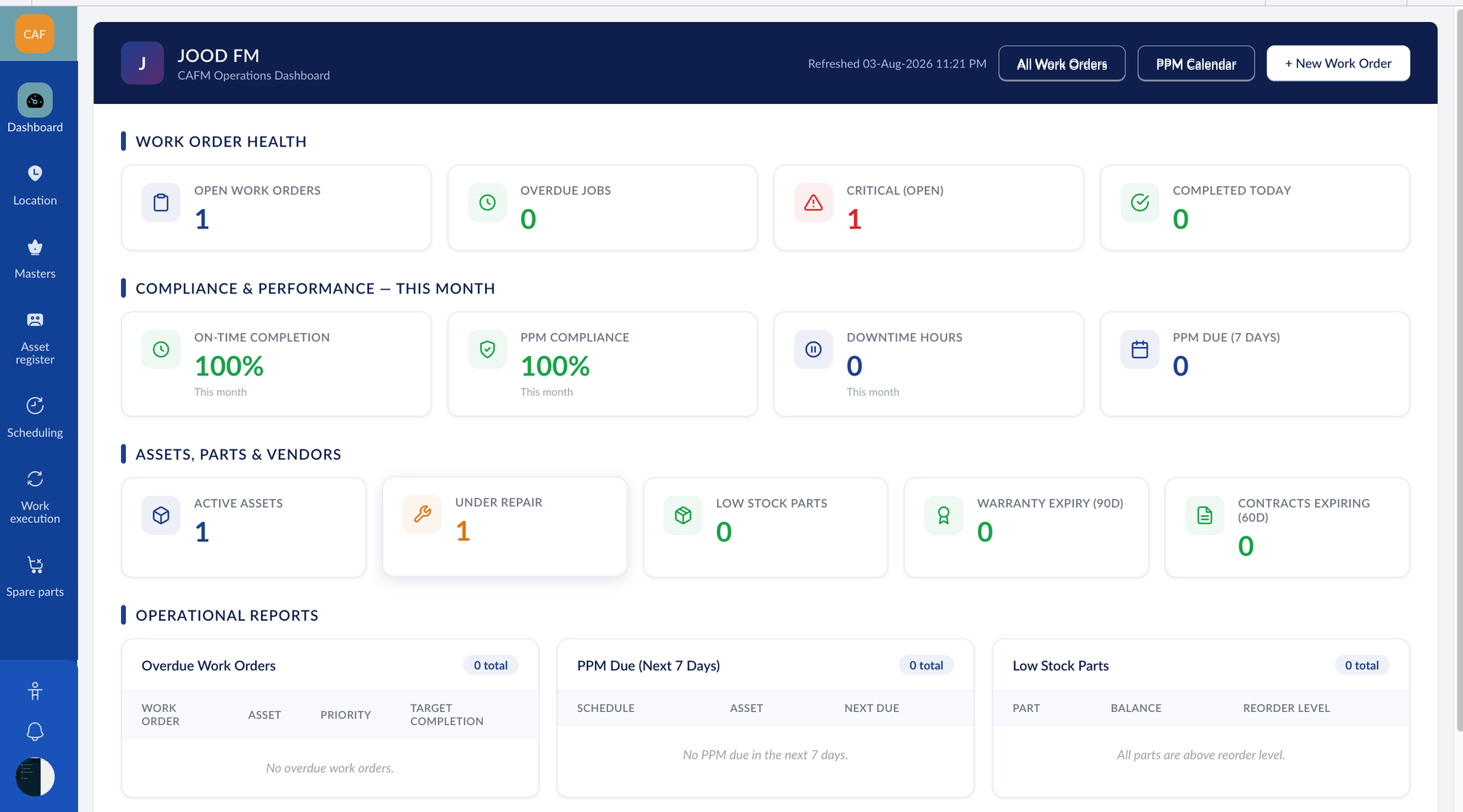
We designed and built a custom CAFM platform on Zoho that turns that operation into a single, auditable system. Assets are registered once and located to the exact room. Maintenance schedules generate their own work orders. Faults become tracked tickets with a clock. Spare-parts stock moves the moment a part is used. Management sees it all on live dashboards.
The build spanned the whole project — requirements and solution design, the data model, the custom Zoho Creator application, the Deluge automation layer, and the configuration of Desk, Analytics, WorkDrive and Flow around it.
The challenge
The operation ran on memory, not records
The failure mode wasn't dramatic — it was quiet. A chiller's quarterly service slips because nobody was tracking it, and it fails during peak season. An auditor asks when the fire pump was last serviced, and there's no answer.
Before
- •No reliable list of what equipment exists or where it sits
- •Servicing happened only when someone remembered
- •Fault reports lost in chat threads
- •No evidence a job was actually done
- •Spare parts ran out mid-repair
- •Management performance was guesswork
After go-live
- •Searchable asset register, located to the room
- •Schedules generate their own jobs automatically, every day
- •Every request becomes a tracked ticket with an owner and a clock
- •Completed checklists, timestamps and technician sign-off
- •Stock falls as parts are consumed; alerts fire before you run dry
- •Live dashboards: SLA compliance, downtime, technician output
The approach
One connected system, not five disconnected ones
Rather than build everything from scratch, we used each Zoho application for what it's already good at and custom-built only the parts with no ready-made equivalent. The count was deliberately kept low — the fewer systems in play, the fewer places data can drift out of step.

Zoho Creator
The CAFM system — custom built

Zoho Desk
Fault tickets & SLA timers

Zoho Analytics
Dashboards & weekly reports

Zoho WorkDrive
O&M manuals & contracts

Zoho Flow
Desk ↔ Creator, Outlook

Deluge
The automation layer
System architecture

Zoho Desk
Fault tickets & SLA timers
Requests raised by staff

Deluge routines
7 automation routines
Daily self-scheduling PPM

Zoho Creator — the CAFM core

Zoho Analytics
Dashboards & weekly reports
SLA, downtime, technician KPIs

Zoho WorkDrive
O&M manuals & contracts
Attached to assets & jobs
 Zoho Flow connects Desk ↔ Creator and pushes notifications to Outlook · 4 roles (administrator, supervisor, technician, storekeeper) enforced at the data layer
What we built
The capabilities delivered
01
Asset register & 4-level locations
Every asset registered with a unique auto-generated ID and located precisely: building → floor → zone → room, so a fault report points at an exact place.
02
Preventive maintenance engine
Define the rule once — “every generator, monthly” — and a daily routine raises the job, attaches the right checklist, and books the next occurrence, indefinitely.
03
Predictive triggers
Service jobs raised when an asset's running hours cross a threshold, independent of the calendar — so machines are serviced on real use, not just dates.
04
Work orders & checklists
One record type for preventive, corrective and predictive jobs, with a governed status lifecycle and reusable checklists copied into every job.
05
Spare parts & stock ledger
Parts and stock live inside Creator. Logging a part on the work order moves the balance immediately — no separate inventory system to reconcile.
06
Ticketing, SLA & dashboards
Faults become Desk tickets with response and resolution clocks; Analytics turns Creator and Desk data into live management dashboards.
Add: the Asset Register list view
Assets grouped by building, with IDs, categories and status visible.
Add: a Work Order with its checklist
Shows checklist execution, parts used and technician sign-off — the evidence story.
Add: the Analytics dashboard
SLA compliance, downtime, PPM compliance and technician KPIs.
Under the hood
The engineering that makes it trustworthy
A maintenance system is only worth having if its records can be trusted. The automation layer was built defensively around that idea.
Self-scheduling PPM
A daily Deluge routine finds every schedule that's due, raises the work order with lead time, and copies the checklist in — built to be safe to re-run, so a retry never double-raises a job.
Enforced completion gate
A job can't be marked complete while a mandatory check is unanswered or the technician hasn't signed off — the checklist becomes real evidence, not an optional formality.
Ledger-based stock
Part balances are recomputed by summing an append-only movement ledger, never incremented in place — so the figure can't silently drift, and every change is auditable.
Role-scoped access
Four roles — administrator, supervisor, technician, storekeeper — with technicians seeing only their own assigned work, enforced at the data layer.
17
Custom Creator forms
7
Deluge automation routines
4
Role-based access profiles
Outcomes
The impact for Jood FM
The system replaced an operation that ran on memory with one that runs on records — visible, scheduled and auditable.
100%
of completed jobs closed with a checklist, timestamp and technician sign-off — an audit trail by design
4-level
location precision, tracing every asset from building down to the exact room
Daily
automatic work-order generation — scheduled maintenance no longer depends on anyone remembering
“For the first time we can open a single screen and see every asset, what's due, and what's already been done. Servicing that used to slip through the cracks now schedules itself — and when an auditor asks when something was last maintained, the record is already there.”
— Facilities Manager, Jood FM
Want a custom system like this on Zoho?
We design and build custom business applications on Zoho — from facility management to CRM and operations platforms. Tell us your process and we'll scope it.